
Game Chat Redesign
Redesign the game's character chat experience
My Role & Process
I led the following processes as a lead UX/UI designer. I collaborated closely with stakeholders, a product manager, a support UI designer, and a technical game designer during the process.
Stakeholder Workshop
Competitor Research
Wireframing
User Flow
UI Design
Prototyping
Developer Hand-Off
Company / Product
Pixelberry Studios / Storyloom
Timeline
May - July 2023 (Design)
November 2023 (Developer Hand-off)
Category
Mobile Application
Gaming
UX Design
UI Design
Project Overview


Before & after the redesign
Chat is an existing feature in the game that provides a texting experience with the other characters within the narrative. As a part of the adding features to Storyloom, stakeholders requested my team to upgrade the chat experience with a new UI system and improved user flow.
Analysis
The current chat menu design is too far from real-life chat applications.
Goals

Through the stakeholder workshop and competitor research, I was able to find out improvement lists for the existing feature. All the user frictions and stakeholder requests are sorted out by product priority. Below is my analysis of the existing chat (and letter) menu.

Analysis - existing Choices chat & letter mode
In addition to the our own product analysis, I researched storytelling game competitors and listed out a few items that we can learn from.

Competitors - MeChat, Chapters, Whispers
Design Solutions
How to make the experience similar to the real-life chat app while still keeping the story game's traits?
Wireframe
Below are wireframes I created to show chat flow and layout of possible functionalities (either already existed or new components)
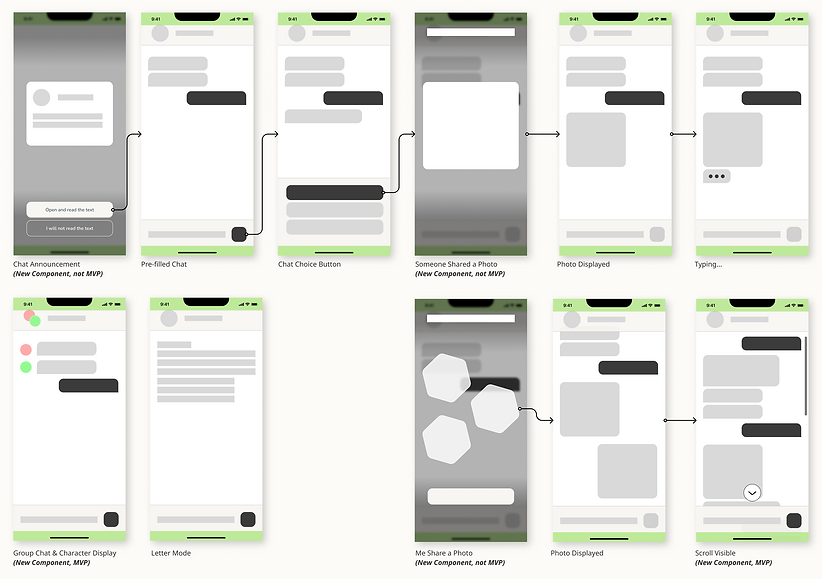
Key Screens & Iterations
Below are my design intentions which were implemented while working on the chat screen.
1. Chat UI should be visible against any background.
The content writers can choose their own custom image for the chat background, so the visibility of all the UI elements against any color/pattern is crucial.
2. The design should both have the real-chat app experience and the game product identity.
3. Simplify any unnecessary UI and interactions.
Below are the evolutions of a few key screens.
Iterations of Typical Chat Screen

Removed unnecessary UI items for the gameplay experience.

Nametag UI to be distinctive and visible against any background color.

Writers can choose to display the main character's name.

Iterations of Choice Button Screen
Premium choice option added. Writers also can choose to add a choice prompt title.
Highlight any chat conversation coming from the choice to let users know their choices matter in the storyline.

Iterations of Image Share Screen
Removed any unnecessary flow.
Users can view the enlarged image when they tap on each photo during the chat.

Prototype & Variations
The feature eventually could support the letter mode and change the UI color settings.
Prototype

Interaction of Chat MVP
Variations
The below images show some of the design variations of the chat feature.


Takeaways
I achieved the following goals when designing the chat feature:
-
Providing a flexible format that content writers can customize while meeting the accessibility standards.
-
Design that has the identity of the storytelling game but also provides real-life chat experiences to users.
So far I described MVP items for the chat feature. Furthermore, I think the following will be a great addition to the chat:
-
Emoji and reaction support
-
Opportunities that players can type in some of the chat answers.