Creator Studio
Desktop-web-based content creator's tool features drove a 20% increase in user-to-creator conversions
My Role & Process
I led the following processes as a lead UX/UI designer. I collaborated closely with stakeholders, a product manager, and two UX/UI designers throughout.
Stakeholder Workshop
Competitor Research
UI Design
Accessibility Check
Prototyping
Responsive Web Design
Developer Hand-Off
Company / Product
Pixelberry Studios / Storyloom
Timeline
July 2023 - September 2023
Category
Creator's Tool
Gaming
Desktop Web
UI Design
UX Design
Project Overview

Creator Studio, from the live Storyloom.com
Storyloom is an interactive storytelling game product with user-generated content. Creator Studio is a tool within Storyloom for users to write their own stories and publish them. I led two Creator Studio features that are desktop-web based, for the mobile-app gameplay functionalities that I designed beforehand. The goal was to speed up gameplay features available for readers by enhancing the creator's tool.
Feature 1 / Keyboard Entry
Creator's Goal: Ability to add a prompt for readers to enter text to customize a character's name
What is Keyboard Entry?
Keyboard Entry lets readers customize their character's name or any prompt while reading the story. For creators, it is a feature to help their readers engage better with the stories they publish.

MVP User Stories
Below are 3 MVP user stories the product team and I defined.
-
As a Creator, I want to change and store Character names dynamically in runtime, so that I can display it at a later point in the story.
-
As a Creator, I want to add a Keyboard Entry Block to my Story’s manuscript, so that I can prompt readers to enter text to be used for a Character’s name
-
As a Creator, I want to preview the Keyboard Entry before I publish the chapter, with or without the character.
Design Deliverables
User Flow
Below is the user flow I defined- you can see the enlarged image when click.

Elements of Keyboard Entry Block (Active Editing State)


Assigned character for readers to rename. Required field
Prompt to help readers to understand the popup. Not a required field, if the creator doesn't give an input then it will not be displayed in the gameplay.

Toggle to show or not show the character portrait with the popup.

Live preview of the Keyboard Entry block

Different States of Keyboard Entry Block

Feature 2 / UI Color Scheme
Creator's Goal: Ability to change the color scheme for my story so the UI matches the mood of the story.
What is UI Color Scheme?
Through user research, our team found the desire for diverse dialogue UI designs to support various creators' writing styles. Different color schemes are a quick solution to support many writing genres, such as mystery or horror.
*If you are interested in reading more about the gameplay UI system that I designed,
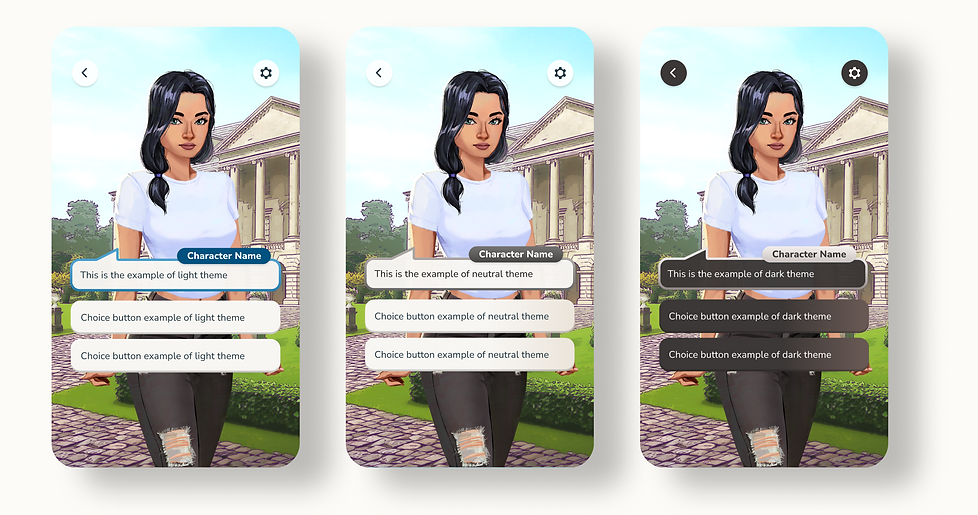
MVP User Stories
Below are 2 MVP user stories the product team and I defined.
1. As a creator, I want to easily change the UI color scheme for my story.
2. As a creator, I can see the UI color scheme I’ve chosen reflected in Live Preview so that I can verify that the theme has been set and that it matches the mood of my story.
Design Deliverables
Places to Edit the UI Color Scheme
For creators, assigning the right UI color scheme should be approachable and appear in many edit stages. Listed menus are available moments to edit/assign the UI color schemes, either by modal or by dropdown menu.
-
Setting the New Stories Flow
-
Edit Story Details Flow
-
Live Preview Flow
-
Publish Stories Flow

Prototype
The below prototype shows the process of assigning UI Color Scheme through the story details flow.
Responsive to the Screen Height
The size and image preview of the modal could shrink in half scale based on the screen height that the creator is viewing.


Takeaways
Seeing through the lens of both the reader and the creator user groups
Working on features for the Creator's Studio gave me valuable insights that I could see through the lens of both the reader and the creator user groups. Understanding the creator's tool process also helped me shape a better user experience for the gameplay. While I was working on the listed Creator's Studio features, I improved the following of the connected gameplay features.
-
Improved character view experience of keyboard entry with positive user testing results
-
Defined character count limits that could impact the creator's studio's formatting.